

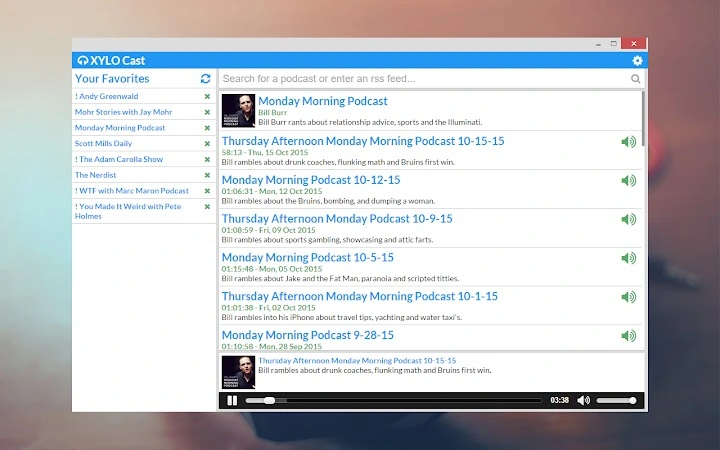
Description
Download Chrome Podcast Manager – Podcast Manager, RSS Feed, Cross-Platform
Overview
Chrome Podcast Manager is a desktop application designed to streamline the process of discovering, listening to, and organizing podcasts across multiple platforms. Built as a cross-platform tool, it supports Windows, macOS, Linux, and ChromeOS, enabling users to manage their favorite audio content seamlessly regardless of their device. The software allows users to stream podcasts directly, save favorites, and sync listening progress across devices, making it ideal for individuals who consume audio content on the go.
It is particularly suited for professionals, students, and casual listeners who rely on podcasts for information, entertainment, or education. The application simplifies the often fragmented experience of managing multiple podcast subscriptions by centralizing them in one accessible interface. It supports both automated and manual podcast discovery through RSS feed input, offering flexibility for users who prefer to search or manually add content.
Given its focus on synchronization and cross-device compatibility, the software is well-suited for users who switch between desktops, laptops, or Chromebooks throughout the day. The developer did not provide additional details about the company or development background. The software’s release history reflects a steady evolution from initial release to version 1.1.1b, with updates focused on usability, stability, and accessibility improvements.
Key Features & Capabilities
- Podcast Streaming & Playback – Users can stream episodes directly within the app without leaving the interface. The player retains audio position when paused and syncs this across devices, ensuring a consistent listening experience.
- Favorite Management – Listeners can save favorite podcasts and episodes for quick access. The app remembers these selections and displays them upon startup, improving workflow efficiency.
- Multi-Platform Sync – The software syncs listening history, favorites, and playback positions across Windows, Mac, Linux, and ChromeOS devices, enabling seamless transitions between platforms.
- RSS Feed Integration – Users can manually input RSS feed URLs, allowing access to podcasts not available through search or directory services.
- Accessibility Enhancements – Options to replace icons with text improve screen reader compatibility, supporting users with visual impairments.
- Auto-Update Features – The app includes a setting to auto-update all podcasts on launch and the ability to manually trigger updates, ensuring users receive the latest episodes promptly.
- Customizable UI – Users can choose between Chrome-style or default OS window styling, adjusting the app’s appearance to match their preferred interface.
These features collectively enhance the podcast management experience by reducing friction in discovery, playback, and organization. For example, a user can begin listening on a Chromebook during a commute, pause mid-episode, and resume from the same point on a desktop at work. Similarly, the RSS feed option allows niche podcast creators or researchers to access specialized content not indexed by mainstream directories.
User Interface, Workflow & Performance
The user interface of Chrome Podcast Manager is designed with simplicity and functionality in mind. The main screen displays a clean layout of podcasts, with episode details accessible through expandable sections. The app remembers the last viewed podcast upon startup, reducing navigation time and improving user flow.
Navigating through the app is intuitive, with a settings pane that supports scrolling and responsive layout adjustments. The interface supports both keyboard and mouse input, catering to different user preferences. The inclusion of accessibility features such as text-based icons demonstrates attention to inclusive design principles.
Performance observations are based on general software behavior patterns. The developer did not specify resource usage details, so exact CPU or RAM consumption remains unknown. However, given the application’s size of 12.3 MB and focus on audio streaming, it is likely optimized for low system impact. Stability appears to have improved over time, with multiple updates addressing issues related to feed parsing, icon rendering, and synchronization failures.
Compatibility & System Requirements
Chrome Podcast Manager is compatible with Windows, macOS, Linux, and ChromeOS, making it one of the few podcast managers available across such a broad range of operating systems. The software is designed to run on desktop environments and leverages the capabilities of each platform to deliver a consistent user experience.
The installation size is 12.3 MB, which is compact for a desktop application with multimedia functionality. The developer did not specify minimum hardware requirements, such as RAM or processor speed. Exact system requirements were not listed, so users should ensure their system meets the baseline demands of running a modern desktop application.
Compatibility information was partially provided. The software’s cross-platform nature suggests it is built using technologies compatible with the listed operating systems, possibly leveraging web-based frameworks or native wrappers. No known conflicts with specific system configurations were reported in the changelog.
Pros and Cons
Pros
- Supports multiple operating systems including Windows, Mac, Linux, and ChromeOS
- Syncs favorites and playback progress across devices
- Offers RSS feed input for custom podcast discovery
- Includes accessibility features like text-based icons
- Auto-update and bulk update options improve content freshness
- Compact size at just 12.3 MB
Cons
- Developer background and company details were not provided
- Exact performance metrics and system requirements were not specified
- Latest version released in 2016; no recent updates indicated
- Interface may feel outdated compared to modern podcast apps
- Limited customization beyond window style and icon display
FAQ Section
Is Chrome Podcast Manager compatible with my operating system?
The software is designed to run on Windows, Mac, Linux, and ChromeOS. If your system is one of these, it should be compatible. No specific hardware requirements were listed.
Can I use this app without an internet connection?
The app requires an internet connection to stream podcasts and sync data. However, it can play previously downloaded episodes offline, depending on the content and user settings.
How does the synchronization work across devices?
Listening history, favorites, and playback positions are synced across devices using cloud-based storage. This ensures that users can resume listening from the same point on any device.
Is the software safe to download and use?
Chrome Podcast Manager is a free desktop application. While no security vulnerabilities were reported in the changelog, users should ensure they download the software from trusted sources to maintain system integrity.
Can I update the app automatically?
Yes, the app includes a setting to enable auto-update on launch. Users can also manually trigger updates to refresh their podcast feeds.
Final Thoughts + CTA
Chrome Podcast Manager offers a reliable, cross-platform solution for managing podcasts across Windows, Mac, Linux, and ChromeOS. Its core strengths lie in synchronization, RSS feed support, and accessibility features that enhance usability for diverse audiences. While the software has not seen updates since 2016, its foundational functionality remains sound for users seeking a lightweight, free podcast manager.
Despite its age, the app continues to serve professionals, students, and casual listeners who value consistency and simplicity. For those needing a no-frills, cross-device podcast experience, it remains a viable option. The compact size and lack of cost make it accessible to a wide range of users.
Download Chrome Podcast Manager now to streamline your podcast experience across all your devices.
Guides & Tutorials for XYLO Cast App for Chrome
How to install XYLO Cast App for Chrome
- Click the Preview / Download button above.
- Once redirected, accept the terms and click Install.
- Wait for the XYLO Cast App for Chrome download to finish on your device.
How to use XYLO Cast App for Chrome
This software is primarily used for its core features described above. Open the app after installation to explore its capabilities.
User Reviews for XYLO Cast App for Chrome 0
No reviews found





